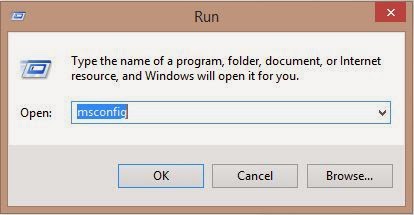
| To Access | Run Commands |
|---|
| Accessibility Controls | access.cpl |
| Accessibility Wizard | accwiz |
| Add Hardware Wizard | hdwwiz.cpl |
| Add/Remove Programs | appwiz.cpl |
| Administrative Tools | control admintools |
| Adobe Acrobat (if installed) | acrobat |
| Adobe Designer (if installed) | formdesigner |
| Adobe Distiller (if installed) | acrodist |
| Adobe ImageReady (if installed) | imageready |
| Adobe Photoshop (if installed) | photoshop |
| Automatic Updates | wuaucpl.cpl |
| Bluetooth Transfer Wizard | fsquirt |
| Calculator | calc |
| Certificate Manager | certmgr.msc |
| Character Map | charmap |
| Check Disk Utility | chkdsk |
| Clipboard Viewer | clipbrd |
| Command Prompt | cmd |
| Component Services | dcomcnfg |
| Computer Management | compmgmt.msc |
| Control Panel | control |
| Date and Time Properties | timedate.cpl |
| DDE Shares | ddeshare |
| Device Manager | devmgmt.msc |
| Direct X Control Panel (if installed)* | directx.cpl |
| Direct X Troubleshooter | dxdiag |
| Disk Cleanup Utility | cleanmgr |
| Disk Defragment | dfrg.msc |
| Disk Management | diskmgmt.msc |
| Disk Partition Manager | diskpart |
| Display Properties | control desktop |
| Display Properties | desk.cpl |
| Display Properties (w/Appearance Tab Preselected) | control color |
| Dr. Watson System Troubleshooting Utility | drwtsn32 |
| Driver Verifier Utility | verifier |
| Event Viewer | eventvwr.msc |
| Files and Settings Transfer Tool | migwiz |
| File Signature Verification Tool | sigverif |
| Findfast | findfast.cpl |
| Firefox (if installed) | firefox |
| Folders Properties | folders |
| Fonts | control fonts |
| Fonts Folder | fonts |
| Free Cell Card Game | freecell |
| Game Controllers | joy.cpl |
| Group Policy Editor (XP Prof) | gpedit.msc |
| Hearts Card Game | mshearts |
| Help and Support | helpctr |
| HyperTerminal | hypertrm |
| Iexpress Wizard | iexpress |
| Indexing Service | ciadv.msc |
| Internet Connection Wizard | icwconn1 |
| Internet Explorer | iexplore |
| Internet Properties | inetcpl.cpl |
| Internet Setup Wizard | inetwiz |
| IP Configuration (Display Connection Configuration) | ipconfig /all |
| IP Configuration (Display DNS Cache Contents) | ipconfig /displaydns |
| IP Configuration (Delete DNS Cache Contents) | ipconfig /flushdns |
| IP Configuration (Release All Connections) | ipconfig /release |
| IP Configuration (Renew All Connections) | ipconfig /renew |
| IP Configuration (Refreshes DHCP & Re-Registers DNS) | ipconfig /registerdns |
| IP Configuration (Display DHCP Class ID) | ipconfig /showclassid |
| IP Configuration (Modifies DHCP Class ID) | ipconfig /setclassid |
| Java Control Panel (if installed) | jpicpl32.cpl |
| Java Control Panel (if installed) | javaws |
| Keyboard Properties | control keyboard |
| Local Security Settings | secpol.msc |
| Local Users and Groups | lusrmgr.msc |
| Logs You Out Of Windows | logoff |
| Malicious Software Removal Tool | mrt |
| Microsoft Access (if installed) | msaccess |
| Microsoft Chat | winchat |
| Microsoft Excel (if installed) | excel |
| Microsoft Frontpage (if installed) | frontpg |
| Microsoft Movie Maker | moviemk |
| Microsoft Paint | mspaint |
| Microsoft Powerpoint (if installed) | powerpnt |
| Microsoft Word (if installed) | winword |
| Microsoft Syncronization Tool | mobsync |
| Minesweeper Game | winmine |
| Mouse Properties | control mouse |
| Mouse Properties | main.cpl |
| Nero (if installed) | nero |
| Netmeeting | conf |
| Network Connections | control netconnections |
| Network Connections | ncpa.cpl |
| Network Setup Wizard | netsetup.cpl |
| Notepad | notepad |
| Nview Desktop Manager (if installed) | nvtuicpl.cpl |
| Object Packager | packager |
| ODBC Data Source Administrator | odbccp32.cpl |
| On Screen Keyboard | osk |
| Opens AC3 Filter (if installed) | ac3filter.cpl |
| Outlook Express | msimn |
| Paint | pbrush |
| Password Properties | password.cpl |
| Performance Monitor | perfmon.msc |
| Performance Monitor | perfmon |
| Phone and Modem Options | telephon.cpl |
| Phone Dialer | dialer |
| Pinball Game | pinball |
| Power Configuration | powercfg.cpl |
| Printers and Faxes | control printers |
| Printers Folder | printers |
| Private Character Editor | eudcedit |
| Quicktime (If Installed) | QuickTime.cpl |
| Quicktime Player (if installed) | quicktimeplayer |
| Real Player (if installed) | realplay |
| Regional Settings | intl.cpl |
| Registry Editor | regedit |
| Registry Editor | regedit32 |
| Remote Access Phonebook | rasphone |
| Remote Desktop | mstsc |
| Removable Storage | ntmsmgr.msc |
| Removable Storage Operator Requests | ntmsoprq.msc |
| Resultant Set of Policy (XP Prof) | rsop.msc |
| Scanners and Cameras | sticpl.cpl |
| Scheduled Tasks | control schedtasks |
| Security Center | wscui.cpl |
| Services | services.msc |
| Shared Folders | fsmgmt.msc |
| Shuts Down Windows | shutdown |
| Sounds and Audio | mmsys.cpl |
| Spider Solitare Card Game | spider |
| SQL Client Configuration | cliconfg |
| System Configuration Editor | sysedit |
| System Configuration Utility | msconfig |
| System File Checker Utility (Scan Immediately) | sfc /scannow |
| System File Checker Utility (Scan Once At The Next Boot) | sfc /scanonce |
| System File Checker Utility (Scan On Every Boot) | sfc /scanboot |
| System File Checker Utility (Return Scan Setting To Default) | sfc /revert |
| System File Checker Utility (Purge File Cache) | sfc /purgecache |
| System File Checker Utility (Sets Cache Size to size x) | sfc /cachesize=x |
| System Information | msinfo32 |
| System Properties | sysdm.cpl |
| Task Manager | taskmgr |
| TCP Tester | tcptest |
| Telnet Client | telnet |
| Tweak UI (if installed) | tweakui |
| User Account Management | nusrmgr.cpl |
| Utility Manager | utilman |
| Windows Address Book | wab |
| Windows Address Book Import Utility | wabmig |
| Windows Backup Utility (if installed) | ntbackup |
| Windows Explorer | explorer |
| Windows Firewall | firewall.cpl |
| Windows Magnifier | magnify |
| Windows Management Infrastructure | wmimgmt.msc |
| Windows Media Player | wmplayer |
| Windows Messenger | msmsgs |
| Windows Picture Import Wizard (need camera connected) | wiaacmgr |
| Windows System Security Tool | syskey |
| Windows Update Launches | wupdmgr |
| Windows Version (to show which version of windows) | winver |
| Windows XP Tour Wizard | tourstart |
| Wordpad | write |