Increase Your PC Performance-Part3

Computer sometimes becomes slow for temporary files, fragmented file, Memory dump etc.Following steps can be taken to clean them:

Defragment:


  1. For windows7: Go to start menu>Accessories>System Tools>Defragmenter
  2. For windows 8: control panel>Defragmenter and optimize drive
  3. Analyzing you can know about amount fragmented files
  4. Then defragment or optimize


Temporary File:
  1. Go to run and type temp and afterward  %temp%
  2. Then a new window will come
  3. Delete all files from that window


Prefetch:
  1. Go to run and type prefetch
  2. Then a new window will come
  3. Delete all files from that window
Note : Clean prefetch files only when you have insufficient space in Hard Drive.

Tree:
  1. Go to run and type tree
  2. Then a new window will come
  3. Delete all files from that window
Refresh RAM:
  1. Go to notepad and type mystring=(80000000)
  2. Then save as RAM.Vbe
  3. Every you want to refresh RAM just double click on that file
  4. you can also download it from here.

Create ReadyBoost on USB Flash drive

readyboost,virtual ram,increase ram,speedup,techwin1


When PC's memory is running low then ready will help you to increase your performance.Creating ReadyBoost on USB Flash drive is very simple.Just follow my steps:


  • Format Flash Drive for safety
  • Go to Flash Drive properties
  • then go ReadyBoost tab
  • select any of the two options
  • click apply and OK.
Here is a video for Creating ReadyBoost on USB Flash drive


Increase Your PC Performance-Part2

Hello! Everyone. I have come with the new post to increase your PC performance. 

You can increase your PC performances by some doing some changes in your Computer. Follow the steps:

Startup:
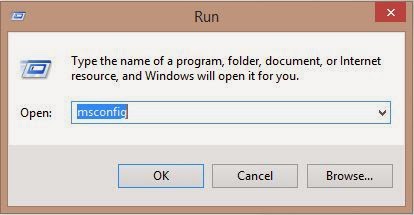
  • PC becomes slow because of some unwanted programs run at start-up. You can just turn them off from Your task manager or you can do it from the run. Simply go to run and write msconfig.
  • Them system configuration window will open. Select startup tab and change enable only those programs.
Autoplay:
  • A virus is another cause of slowing PC. You can protect your PC from viruses of external drives by turning Autoplay off.
  • Go to run again type gpedit.msc. Go to Administrative Templates>Windows Components>Autoplay Policies
  • Open it and click Enable and select All drives then apply and ok.
  • Restart PC


Increase Your PC Performance-Part1

In many ways our PC become slow. Some unimportant files and junk files may cause your PC to slow down. Slow PC is a great problem.We become and sad by using PC. To make your PC fast you need to just follow some simple steps.As I am using windows 8.1, so will show you in my way. Please help yourself on your PC.

1.Adjusting Windows For Best Performance: 

  • First, go to Computer Properties


  • Then Go to Advanced system settings and to Advanced Tab and click on Performance settings
  • Then select third one Adjust for best performance
  •  Click apply and Ok.